
Fix Delta Executor Not Injecting Problem (July 2025)
Errors and glitches are common when using Roblox executors for game exploitation, and Delta Executor users often face script injection problems. If you’re struggling with the Delta Executor not injecting problem in 2025, you’re not alone. Many users report difficulties in successfully injecting scripts into Roblox games. This guide provides a straightforward fix to resolve Delta Executor script injection errors, helping you get back to seamless gameplay.

How to Fix Delta Exploit Not Injecting Problem (2025)
Unlike other Delta issues and errors, injecting issue can easily be fixed by applying the following steps:
- First, you need to uninstall and install Delta Executor from its official website: Delta-executor.com.
- Once installed, launch the executor and check if the error remains.
- If you continue to get the same error then you will have to click on the ‘Configure’ option located from the left side panel.
- After that, you need to click on the ‘Fixes‘ option as shown in the below picture.
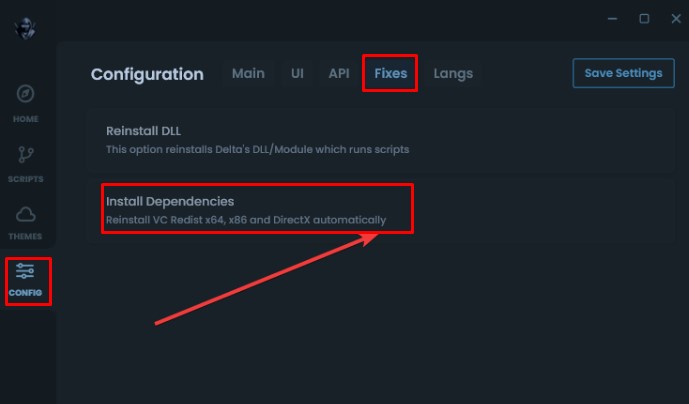
- After doing this, you need to click on the “Install Dependencies” option.
- When you do so, a pop up message will appear on the screen that says, “Make sure to press ‘Start Fix’ on the windows that opens”.
- Now, click on the Ok button.

- When you do so, a new window will appear on the screen.
- There, you need to click on the ‘Start Fix’ option.
- After that, you need to follow the on-screen instruction.
- Once done, close the application and then relaunch and check if the error persists.
- Now, the error will be gone.
- That’s it.
That’s all you need to know about how to resolve the Delta Executor not injecting issue right now.