
Delta Executor Roblox Upgrade Error Fix Guide (August 2025)
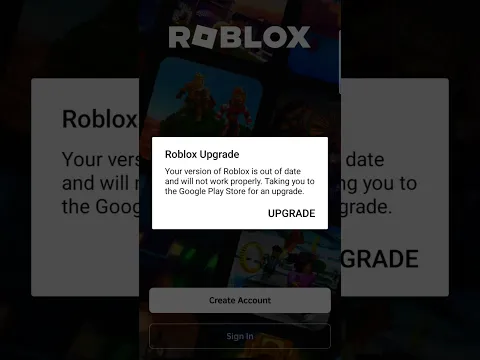
if you’re using Delta Executor to run scripts and enhance your Roblox gameplay, you may encounter the Roblox Upgrade Error stating that your version is out of date. As one of the most downloaded Roblox exploits, Delta Executor has some issues with outdated versions. This error usually appears when launching the Delta Exploit app, preventing it from working with the latest Roblox update. The reason behind this issue is that your current executor version is expired. Since updated versions of these exploits are not available on the Google Play Store, you must download the latest version from a trusted source like Deltaexecutorsapp.com. Follow this step-by-step Roblox Upgrade Error Fix 2025 guide to resolve the issue and get Delta Executor working again.
We know it feels very frustrating when you download a file from a browser and it won’t work. Here, we try to discuss all the persisting and ongoing issues that our users are facing while using mobile Roblox executors. It’s a request to all the users to not download files from every website as these files may contain bugs and viruses that can harm your device. Moreover, we have received many messages on our social handles that users are facing Delta Executor not injecting problem. To deal with this issue we have written a detailed article on how to fix this issue. Click on the link to check it out.

What Causes Roblox Upgrade Error In Delta Executor?
Whenever you encounter Roblox Upgrade error while launching Delta exploit, it means the version of the executor you are trying to use is outdated.
If this error is preventing you from running Roblox scripts, visit its official website and update it to the latest version.
Once it is updated, launch it on your PC or Mobile and check if the error is gone or not.
Also Read > Get Delta Mobile Android Key.
How to Fix Delta Executor Roblox Upgrade Error?
Whenever you get the Roblox Upgrade error while launching Delta Executor, the first thing you should do is uninstall or remove Delta from your device.
Before you begin your installation process, let me tell you that a lot of Delta users are currently showing this message despite Delta executor is 100% working.
In that case, you must click on the Not Now button. When you do so, you will be able to access the executor without uninstalling or downloading the latest version.

After doing this, if you are unable to use Delta, you have no option but to uninstall the current version or download the latest version.
To uninstall Delta Executor from your phone, tap and hold on the executor icon and select ‘Uninstall’.
When you do so, a pop-up will appear on the screen asking you to uninstall the app.
Tap on the OK button to confirm the action.
Once the application is uninstalled, open a search browser and visit Delta Executor’s official site, Delta-executor.com.
After visiting the site, scroll down and click on the ‘Download Now‘ button.
When you do so, you will have the latest version of the executor downloaded.
Once downloaded, go to the download folder and tap on the downloaded file.
When you do so, the installation process will begin.
Once installed, launch the executor and check if the error remains.
That’s how you can fix the Delta Executor Roblox Upgrade error.